> ## Documentation Index
> Fetch the complete documentation index at: https://docsv4.mile.app/llms.txt
> Use this file to discover all available pages before exploring further.
# Introduction
> What the platform does and how the web app is organized.
The platform helps you run a **field team**: drivers, couriers, sales staff, technicians or surveyors who do their work outside the office. Your office team plans the work on the web app, the field team does it on the field app, and everyone sees progress as it happens.
## How work flows through the app
1. **Design the work.** A [task type](/pages/workflow/task-type/introduction) is the form your field worker fills in, built from fields such as text, photo, signature and bill.
2. **Create and plan the work.** Create [tasks](/pages/activities/task/introduction) one at a time, import them from a spreadsheet, repeat them on a [schedule](/pages/planning/schedule/task-schedule), or let [route planning](/pages/planning/routing/introduction) decide which vehicle visits which customer and in what order.
3. **Do the work.** Field workers open their tasks on the field app, follow the route and capture data, photos and signatures.
4. **Watch the work.** Follow your team live on [Tracking](/pages/monitoring/tracking/introduction), react to [alerts](/pages/monitoring/alert), and measure results on [dashboards](/pages/analytics/dashboard).
5. **Automate the routine.** [Automations](/pages/workflow/automation/introduction) assign tasks, send notifications or call your own systems when something happens.
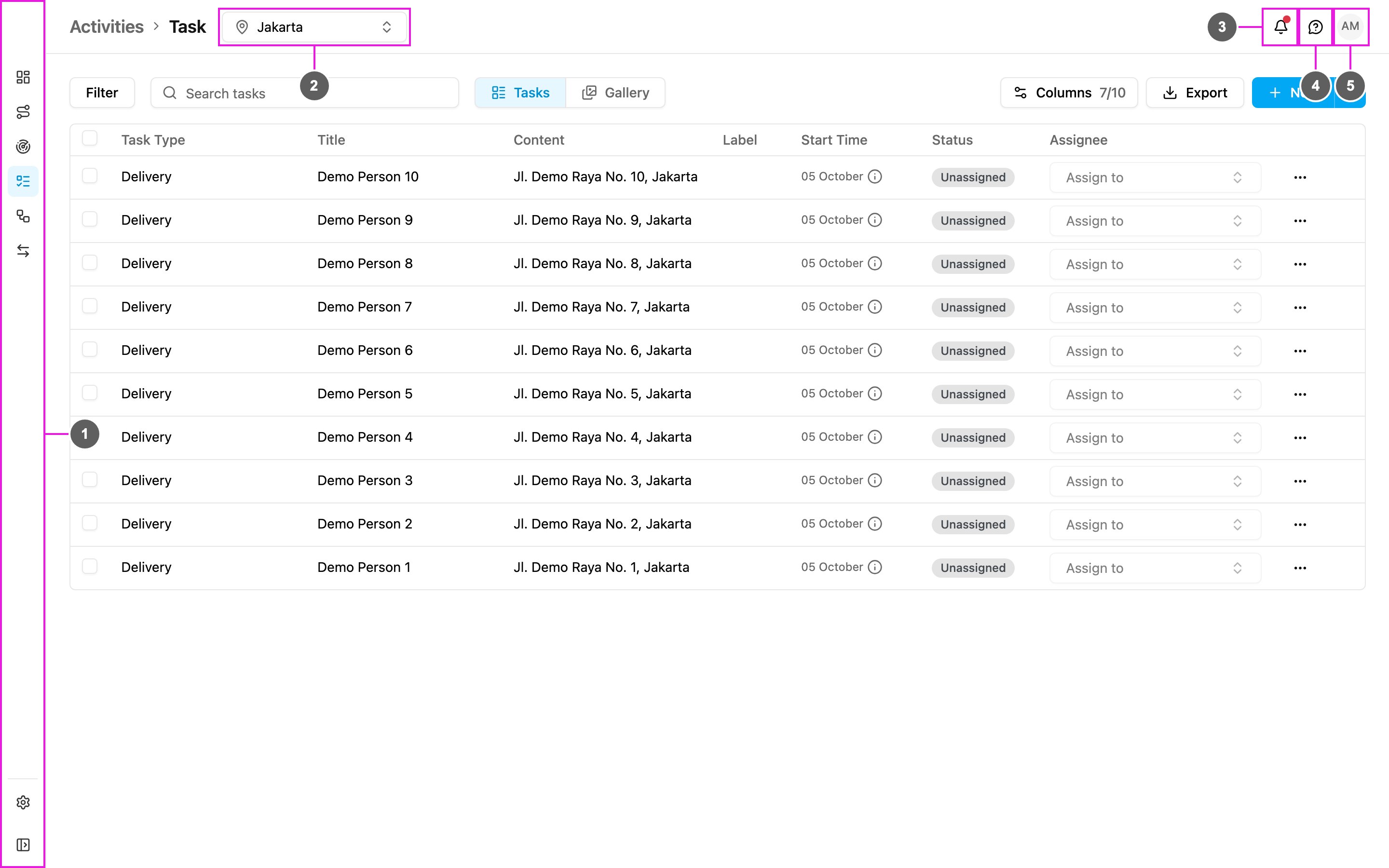
## The screen
1. **Left menu**: every part of the app. Click **Collapse Menu** at the bottom to show the menu names.
2. **Hub picker**: the hub you are working in. Lists such as tasks, visits and users show only the selected hub. Pages that cover the whole organization hide the picker.
3. **Notifications**: alerts and messages for you, and what's new in the app.
4. **Help**: the product guides, the API documentation, the field app download and support.
5. **Your profile**: your account, password, sign-in security and organization.
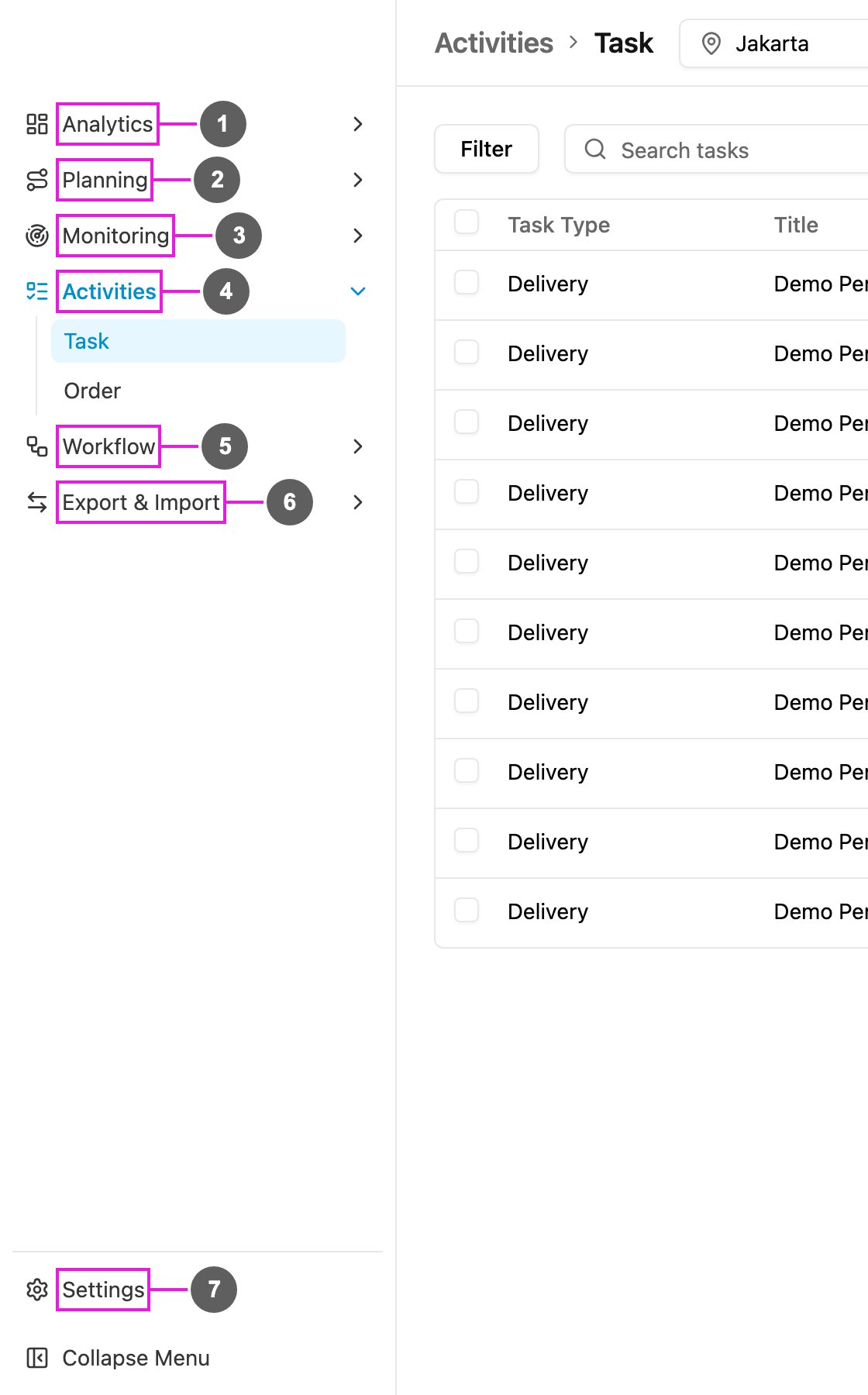
## The left menu
| Menu | What it is for |
| - | - |
| **Analytics** | [Dashboards](/pages/analytics/dashboard) and [Insight](/pages/analytics/insight) |
| **Planning** | [Routing](/pages/planning/routing/introduction) and [Schedule](/pages/planning/schedule/task-schedule) |
| **Monitoring** | [Tracking](/pages/monitoring/tracking/introduction), [Alert](/pages/monitoring/alert) and [Chat](/pages/monitoring/chat/introduction) |
| **Activities** | [Task](/pages/activities/task/introduction) and [Gallery](/pages/activities/task/gallery) |
| **Workflow** | [Data Type](/pages/workflow/data-type/introduction), [Data Source](/pages/workflow/data-source/introduction), [Task Type](/pages/workflow/task-type/introduction) and [Automation](/pages/workflow/automation/introduction) |
| **Export & Import** | [Export](/pages/export-import/export) and [Import](/pages/export-import/import) |
| **Settings** | [Users, roles, hubs and everything about your organization](/pages/settings/introduction) |
Moving from the previous version? [What's New](/pages/whats-new) shows where every page went.
This documentation is built and hosted on [Mintlify](https://mintlify.com), a developer documentation platform.