> ## Documentation Index
> Fetch the complete documentation index at: https://docsv4.mile.app/llms.txt
> Use this file to discover all available pages before exploring further.
# Multi Trip
> Let a vehicle go back to the hub to reload and start another trip.
By default each vehicle makes one trip. With **Multi Trip** on, a vehicle can finish a trip, go back to the hub to reload, and start a new trip with more visits, all within its working time.
* Vehicles may return to the hub during their working hours.
* One vehicle can make several trips in a day.
* Useful when the visits are more than a vehicle can carry at once.
* Turning it on also turns on [Return to Hub](/pages/planning/routing/configuration/return-to-hub).
Required permission:
* View configuration
* Edit configuration
## Turning it on
1. Open **Planning › Routing › Configuration** and go to **Optimization**.
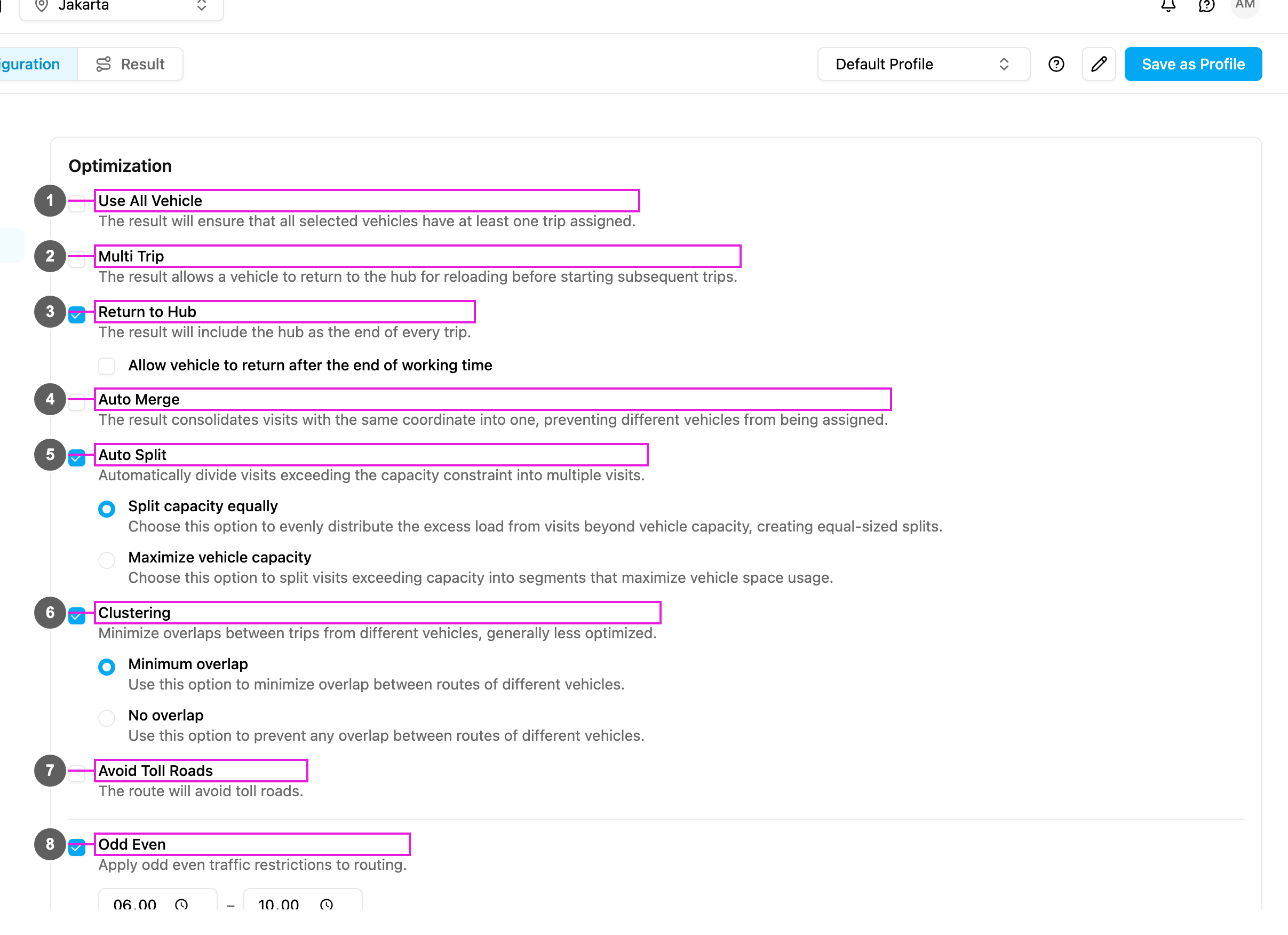
2. Tick **Multi Trip** (item 2 in the picture).
The change is saved as soon as you make it.
If your plan doesn't include Multi Trip, ticking it shows **Upgrade to use more** and the box stays unticked.
Turning on Multi Trip also turns on **Return to Hub**, because a vehicle has to be back at the hub to reload.
## How it works
| | Without Multi Trip (default) | With Multi Trip |
| - | - | - |
| Goal | Serve the vehicle's visits in one trip. | Serve more visits over several trips. |
| Limit | The vehicle's capacity for one trip. | The vehicle's capacity per trip, and its working time. |
| Result | Visits beyond capacity go to another vehicle or are dropped. | The same vehicle serves more visits. |
| Example: capacity 20 packages, 35 packages to deliver | Vehicle 1 takes 20, vehicle 2 takes 15. | Vehicle 1 makes 2 trips: 20 and 15. |
In the result, each trip of a vehicle is listed separately.
## Use cases
**Busy days**: 50 deliveries, 3 vehicles that each carry 20. With Multi Trip each vehicle makes 2 trips and all 50 deliveries are served with the fleet you have.
**Perishable goods**: a food service wants little time between loading and delivery. Multi Trip with short trips and frequent hub returns keeps the goods fresh while still using each vehicle fully.
**Mixed loads**: fragile, heavy and temperature-sensitive goods need separate trips. Use Multi Trip with a [capacity constraint](/pages/planning/routing/configuration/capacity-constraint) per product type: the same vehicle carries different loads on different trips.
## When to use it
**Use it when**:
* the visits are more than one trip can carry,
* you want to get the most out of each vehicle,
* the working hours are long enough for several trips,
* the hub is central and the visits are near it,
* several trips cost less than adding vehicles.
**Avoid it when**:
* the visits fit easily in one trip,
* the hub is far from the service area,
* the working hours are too short,
* the time windows leave no room to go back to the hub,
* the trip back to the hub costs more than it saves.
## Multi Trip and Return to Hub
| Action | What happens |
| - | - |
| Turn on Multi Trip | Return to Hub is turned on too. |
| Turn off Return to Hub | Multi Trip is turned off too. |
| Turn on Return to Hub | Multi Trip stays as it is. |
## Frequently asked questions
**How many trips can a vehicle make?**
There is no fixed limit. The number depends on working hours, capacity, locations and time windows.
**Does Multi Trip make the distance longer?**
Usually, because of the trips back to the hub. In return you may need fewer vehicles.
**Can I set the number of trips per vehicle?**
No. You influence it through capacity and working hours.
**Does it respect time windows?**
Yes. Trips are ordered so every visit is still served inside its open time.
**Will every vehicle make several trips?**
Not necessarily. Some vehicles may make one trip and others several.
**What about the driver's working hours?**
All trips, including the drives back to the hub, fit inside the vehicle's working time.
This documentation is built and hosted on [Mintlify](https://mintlify.com), a developer documentation platform.