> ## Documentation Index
> Fetch the complete documentation index at: https://docsv4.mile.app/llms.txt
> Use this file to discover all available pages before exploring further.
# Task Schedule
> Create tasks automatically on a repeating schedule.
A **task schedule** creates tasks for you on a repeating plan. If a task has to happen every week for the next three months, set up one schedule instead of creating the task by hand each week. Examples are a store restock every morning, a cold storage check every Monday and Thursday, or a machine service every two months.
Each time a schedule comes due, it creates one task from the task type you chose, with the values you filled in, assigned to the people you picked.
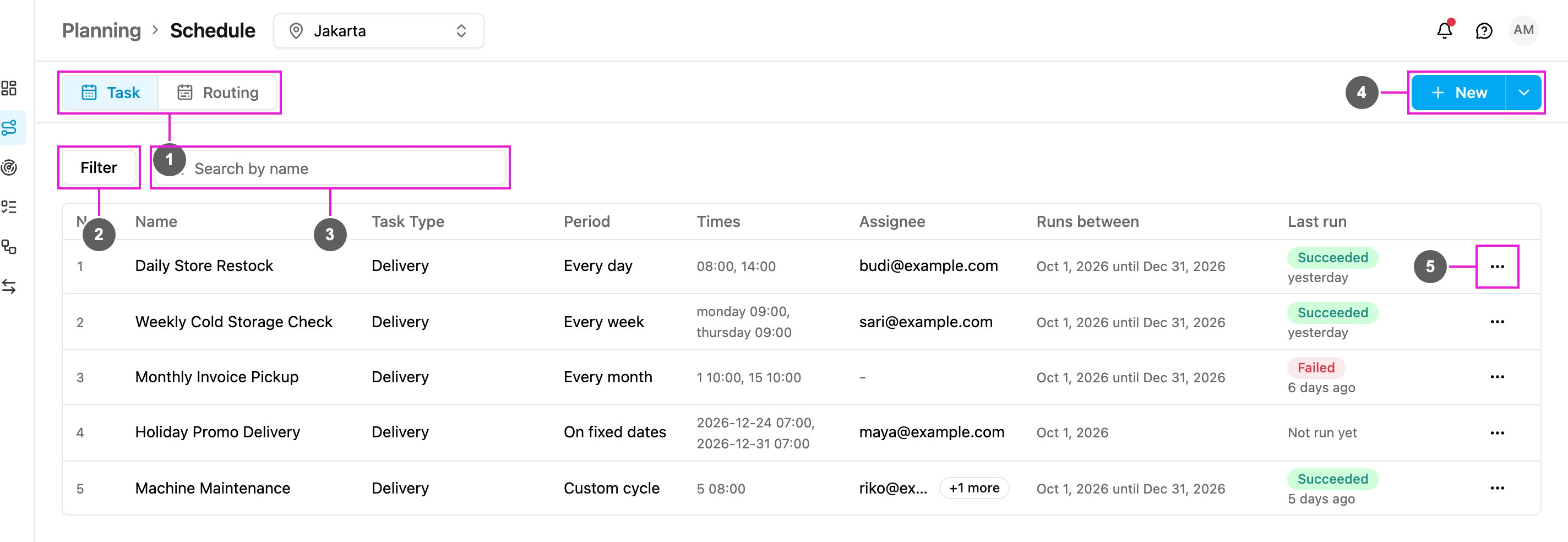
Open **Planning › Schedule**. The **Task** tab is selected.
Required permission:
* View schedule
1. **Task / Routing**: switch between task schedules and [routing schedules](/pages/planning/schedule/routing-schedule/introduction).
2. **Filter**: narrow the list by status, assignee and task type.
3. **Search by name**: find a schedule by part of its name.
4. **New**: [create a schedule](/pages/planning/schedule/creating-a-task-schedule). The arrow beside it opens **Bulk**, to [create many schedules from a spreadsheet](/pages/planning/schedule/bulk-create-task-schedules).
5. **Actions** of a schedule: View, Edit and Delete. See [Manage Task Schedules](/pages/planning/schedule/manage-task-schedules).
The list shows the schedules of the hub selected at the top of the page. Switching the hub reloads the list.
## Repeat cycles
A schedule repeats in one of five ways:
| Repeat | Creates a task |
| - | - |
| [Every day](/pages/planning/schedule/repeat-cycle/daily) | Every day, at one or more times. |
| [Every week](/pages/planning/schedule/repeat-cycle/weekly) | On the weekdays you pick, at a time for each. |
| [Every month](/pages/planning/schedule/repeat-cycle/monthly) | On the days of the month you pick, at a time for each. |
| [On fixed dates](/pages/planning/schedule/repeat-cycle/by-date) | Only on the dates and times you list. |
| [Custom cycle](/pages/planning/schedule/repeat-cycle/custom) | Every few days, weeks or months, for example every 2 months. |
## In this section
* [Creating a Task Schedule](/pages/planning/schedule/creating-a-task-schedule)
* [Repeat cycles](/pages/planning/schedule/repeat-cycle/daily)
* [Manage Task Schedules](/pages/planning/schedule/manage-task-schedules)
* [Bulk Create Task Schedules](/pages/planning/schedule/bulk-create-task-schedules)
This documentation is built and hosted on [Mintlify](https://mintlify.com), a developer documentation platform.