> ## Documentation Index
> Fetch the complete documentation index at: https://docsv4.mile.app/llms.txt
> Use this file to discover all available pages before exploring further.
# Assign Task
> Assign each new task to a user automatically.
**Assign Task** assigns the task that started the automation to a user. New tasks reach the right field worker without anyone assigning them by hand.
Available for: **On Task Created** only.
Required permission:
* View automation
* Create automation
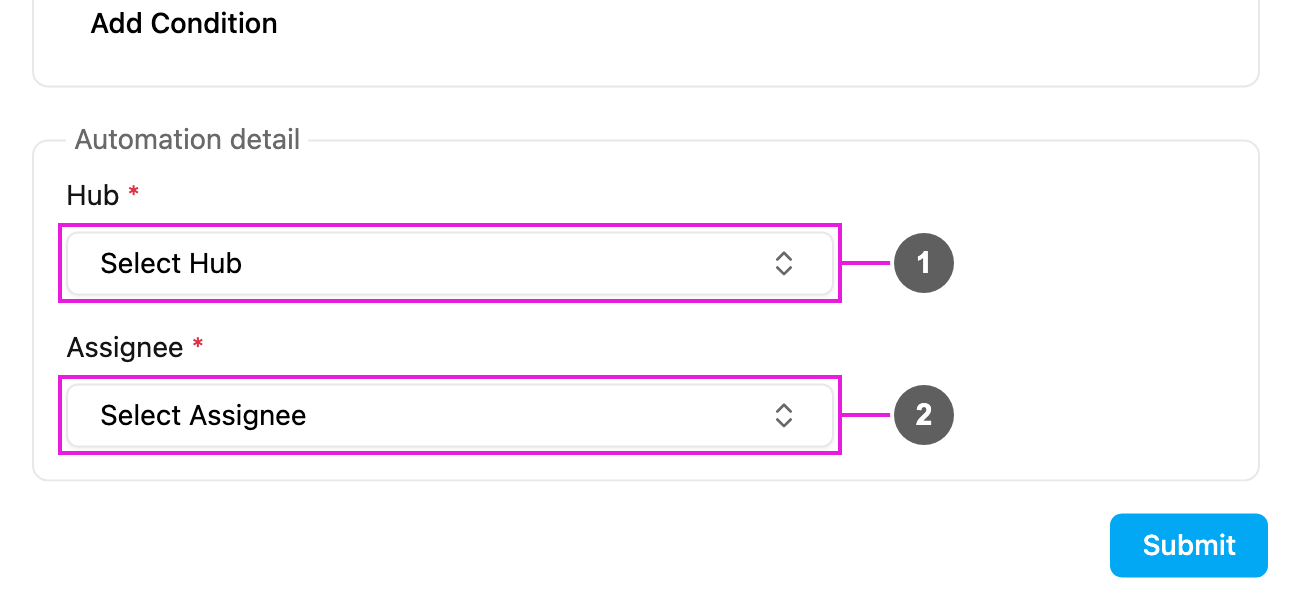
## Automation detail
1. **Hub**: required. The hub the assignee works in. The task is assigned in this hub.
2. **Assignee**: required. The user who gets the task: a field worker, a team lead or any user who works in that hub.
## How it works
1. A task of the automation's task type is created.
2. The [rules](/pages/workflow/automation/rules), if any, are checked.
3. The task is assigned to the chosen user in the chosen hub straight away.
4. The assignee is notified, depending on their settings, and the task appears in their list in the field app.
* One automation assigns to one user. To spread tasks over several people, create several Assign Task automations with different rules.
* A task that is already assigned is not reassigned.
* The assignee must have access to the chosen hub.
* For more advanced assignment logic, send the task to your own system with a [Webhook](/pages/workflow/automation/actions/webhook) and assign it through the API.
## Examples
| Scenario | Task Type | Hub | Assignee | Rule |
| - | - | - | - | - |
| By location | Delivery | Jakarta | a Jakarta driver | none |
| Balance workload | Service Calls | Customer Service Hub | a service representative | Area = North |
| Specialist work | Technical Repair | Maintenance Hub | the lead technician | none |
| VIP customer | Delivery | Jakarta | a senior driver | Customer Name = Toko Maju Jaya |
## Troubleshooting
**The task isn't assigned.**
* Check that the automation is **Active**, its task type matches, and the rules don't exclude the task.
* Check that the assignee still has access to the hub.
**The wrong user gets the tasks.**
* Edit the automation and check **Assignee**.
* Look for other active automations on the same task type.
* Check the user's current hubs on [User](/pages/settings/user/introduction).
This documentation is built and hosted on [Mintlify](https://mintlify.com), a developer documentation platform.