> ## Documentation Index
> Fetch the complete documentation index at: https://docsv4.mile.app/llms.txt
> Use this file to discover all available pages before exploring further.
# Introduction
> Run an action automatically whenever something happens to a task, a trip, a routing result or a data source.
An **automation** watches for an **event**, such as a task being finished, and runs an **action**, such as creating the next task, calling your own system or messaging the customer. Automations streamline task creation, assignment and placement, and with a webhook they can feed any other system.
Every automation has four parts:
| Part | What it decides | Example |
| - | - | - |
| **Event** | When the automation runs. | On Task Finished |
| **Task Type** (or Data Type, or Geofence Group) | Which records the event is watched on. | Delivery |
| **Rules** | Optional conditions the record must also meet. | Customer Name is Toko Maju Jaya |
| **Automation Type** and **Automation detail** | What happens, and how. | Create Task: a Pickup task with the delivery's address |
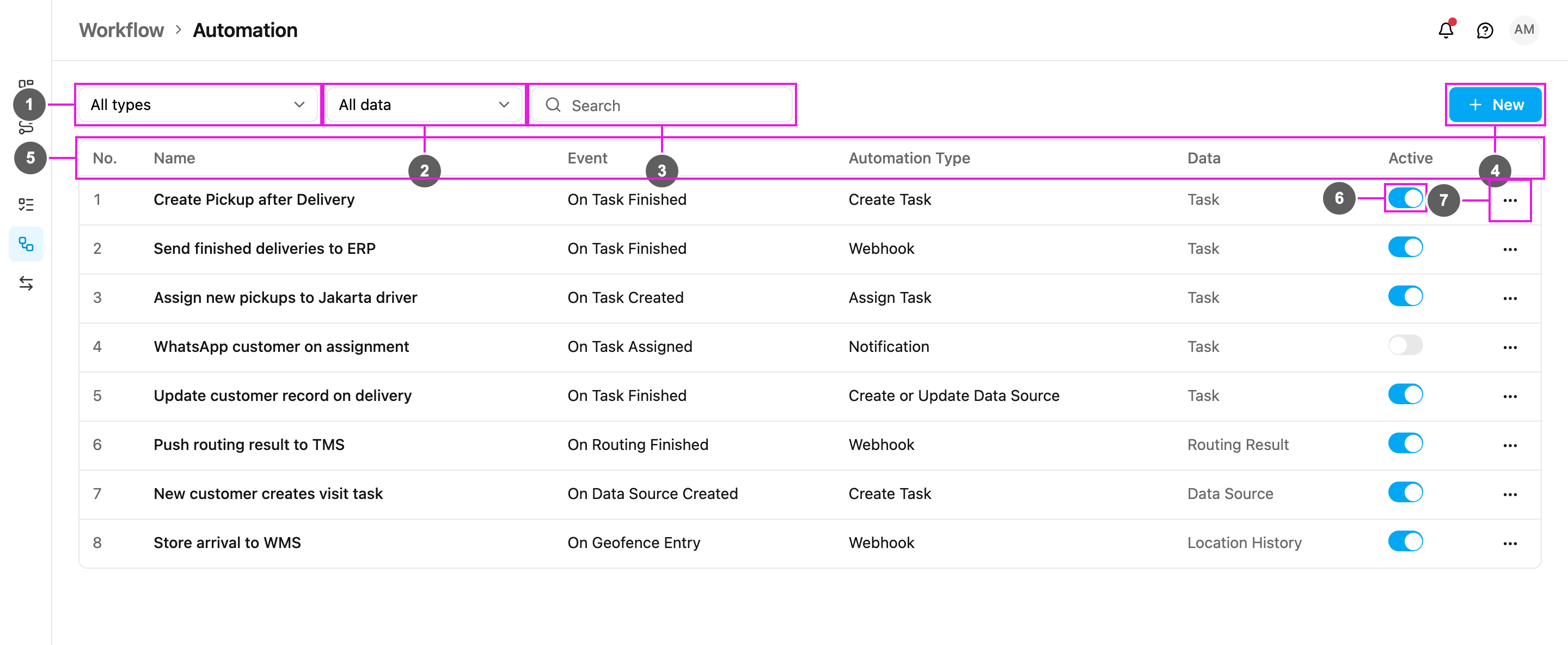
Open **Workflow › Automation** to see the list.
Required permission:
* View automation
* Create automation, Edit automation, Delete automation
1. **All types**: show only automations with one automation type (Create Task, Webhook, Notification and so on).
2. **All data**: show only automations whose event belongs to one data group: Task, Data Source, Routing Result or Location History.
3. **Search**: find an automation by name.
4. **New**: create an automation. See [Creating an automation](/pages/workflow/automation/creating-an-automation).
5. The table columns:
* **No.**: the row number.
* **Name**: the automation's name.
* **Event**: what starts it, for example On Task Finished.
* **Automation Type**: what it does, for example Create Task.
* **Data**: which data group the event belongs to (Task, Data Source, Routing Result or Location History).
* **Active**: whether the automation runs.
6. **Active** switch: blue means the automation runs, grey means it is switched off and is never triggered.
7. **⋯** menu: **Edit**, **Log** and **Delete**. See [Managing automations](/pages/workflow/automation/managing).
* Switch an automation on after you set it up. Only active automations run.
* When several automations are active, it can take a moment for all of them to finish.
* Check the [automation log](/pages/workflow/automation/log) to see whether a run succeeded or failed.
* If a change made by an automation does not show on the Task page yet, reload the page.
## Events and actions at a glance
Ten events are available, in four groups. Each event allows only some automation types:
| Event | Create Task | Create and Assign Task | Move Task | Assign Task | Update Task | Create or Update Data Source | Webhook | Notification |
| - | - | - | - | - | - | - | - | - |
| [On Task Created](/pages/workflow/automation/events/on-task-created) | ✓ | ✓ | ✓ | ✓ | ✓ | | ✓ | ✓ |
| [On Task Assigned](/pages/workflow/automation/events/on-task-assigned) | ✓ | | | | | | ✓ | ✓ |
| [On Task Finished](/pages/workflow/automation/events/on-task-finished) | ✓ | ✓ | | | | ✓ | ✓ | ✓ |
| [On Start Trip](/pages/workflow/automation/events/on-start-trip) | | | | | | | ✓ | |
| [On Finish Trip](/pages/workflow/automation/events/on-finish-trip) | | | | | | | ✓ | |
| [On Geofence Entry](/pages/workflow/automation/events/on-geofence-entry) | | | | | | | ✓ | |
| [On Geofence Leave](/pages/workflow/automation/events/on-geofence-leave) | | | | | | | ✓ | |
| [On Routing Finished](/pages/workflow/automation/events/on-routing-finished) | | | | | | | ✓ | |
| [On Routing Dispatched](/pages/workflow/automation/events/on-routing-dispatched) | | | | | | | ✓ | |
| [On Data Source Created](/pages/workflow/automation/events/on-data-source-created) | ✓ | | | | | | ✓ | |
The actions:
| Automation Type | What it does |
| - | - |
| [Create Task](/pages/workflow/automation/actions/create-task) | Creates a new task of another task type, filled from the triggering record. |
| [Create and Assign Task](/pages/workflow/automation/actions/create-and-assign-task) | Creates a new task and places it in a hub and on a user at once. |
| [Move Task](/pages/workflow/automation/actions/move-task) | Moves the triggering task to another hub. |
| [Assign Task](/pages/workflow/automation/actions/assign-task) | Assigns the triggering task to a user in a hub. |
| [Update Task](/pages/workflow/automation/actions/update-task) | Changes fields of the triggering task. |
| [Create or Update Data Source](/pages/workflow/automation/actions/create-or-update-data-source) | Writes the task's values into a data source record. |
| [Webhook](/pages/workflow/automation/actions/webhook) | Sends the event to a URL of your own system. |
| [Notification](/pages/workflow/automation/actions/notification) | Sends a [WhatsApp](/pages/workflow/automation/actions/notification-whatsapp) message, an [SMS](/pages/workflow/automation/actions/notification-sms) or an [email](/pages/workflow/automation/actions/notification-email). |
## Common uses
* **Chain tasks**: On Task Finished › Create Task creates the pickup after a delivery, or the inspection after an installation.
* **Distribute work**: On Task Created › Assign Task sends new tasks straight to the right driver.
* **Integrate**: any event › Webhook pushes data to an ERP, WMS, CRM or TMS in real time.
* **Keep customers informed**: On Task Assigned › Notification sends a WhatsApp message with the tracking link.
* **Keep master data current**: On Task Finished › Create or Update Data Source writes the latest customer details back to a data source.
This documentation is built and hosted on [Mintlify](https://mintlify.com), a developer documentation platform.