> ## Documentation Index
> Fetch the complete documentation index at: https://docsv4.mile.app/llms.txt
> Use this file to discover all available pages before exploring further.
# Field types
> The kinds of values a data type field can hold, and the rules each one supports.
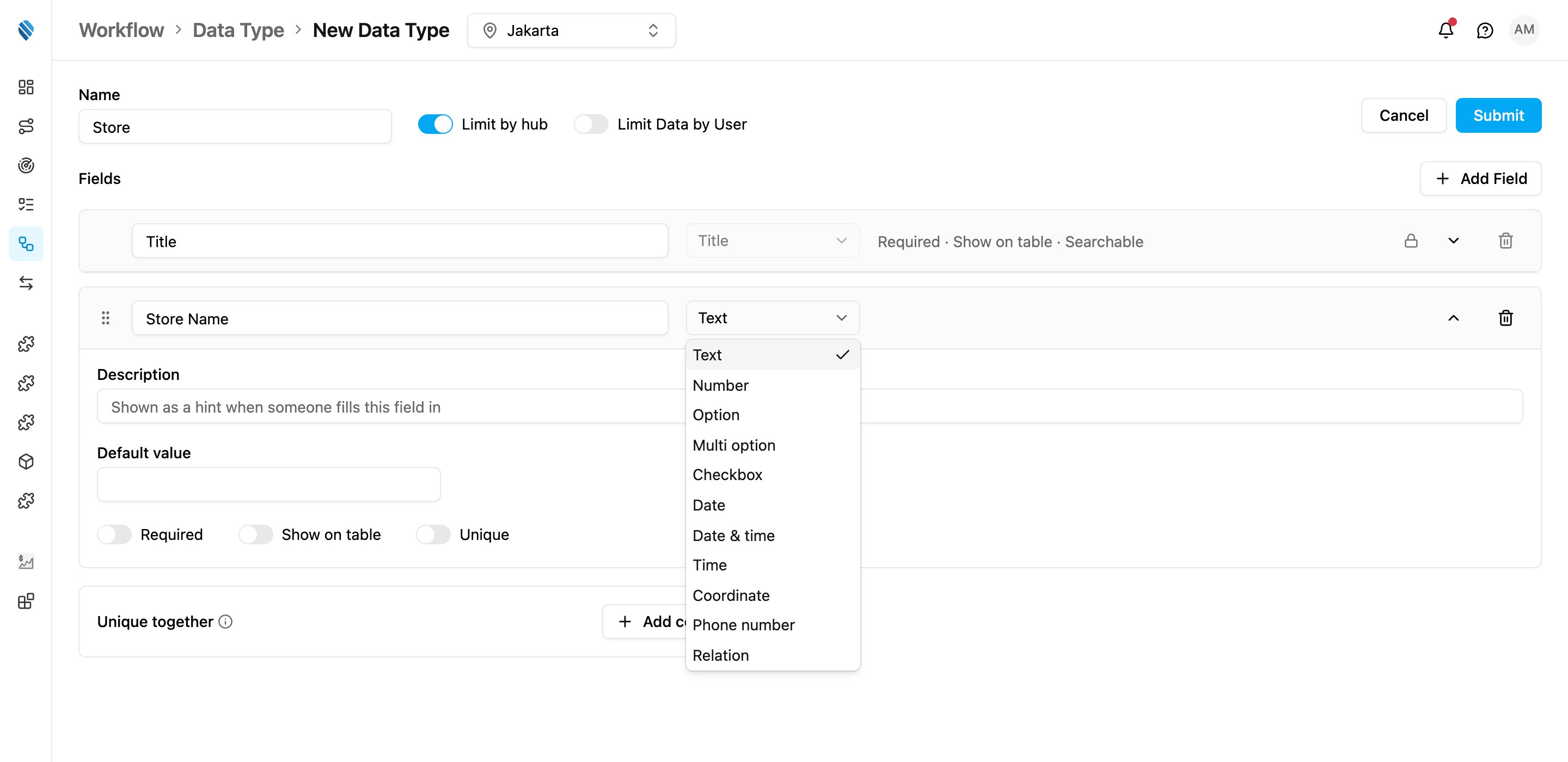
Pick a field's type from the **Type** list when you add or edit a field. **Title** isn't in the list: every data type already has its one Title field.
| Type | What it holds | Rules you can set |
| - | - | - |
| **Title** | The value that identifies each record, such as a code. Every data type has one, and it is always the first field. | None. It is always required, unique, searchable and shown. |
| **Text** | Free text, such as a name or an address. | Default value |
| **Number** | A number, such as a price or a weight. | Minimum, Maximum, Decimal places, Default value |
| **Option** | One choice from a list you type in **Options**. | Options, Default value |
| **Multi option** | Several choices from the list in **Options**. | Options, Minimum choices, Maximum choices (no Required switch) |
| **Checkbox** | Yes or no. | None |
| **Date** | A date. | Minimum, Maximum, Default value |
| **Date & time** | A date and a time. | Minimum, Maximum, Default value |
| **Time** | A time of day, such as an opening time. | Minimum, Maximum, Default value |
| **Coordinate** | A latitude and longitude, such as `-6.2088,106.8456`. | None |
| **Phone number** | A phone number of 10 to 16 digits. | Default value |
| **Relation** | A link to a record of another data type, or to a user, hub, vehicle, role or task type. | Target, Relationship, Display field, Unique, Searchable |
## Options
For **Option** and **Multi option**, type each choice in **Options** and press Enter. A field needs at least one option. The same choice can't be listed twice.
## Minimum and maximum
* For a **Number**, the lowest and highest value allowed, and the number of **Decimal places**.
* For a **Multi option**, how many choices must be picked at least and at most.
* For **Date**, **Date & time** and **Time**, the earliest and latest value allowed. Each bound is either **A fixed value** or another date field of the same data type, so an *End Date* can be required to be after the *Start Date*. Choose **Same or later** / **Later only** for the minimum, and **Same or earlier** / **Earlier only** for the maximum.
The minimum can't be greater than the maximum.
## Relation
A **Relation** field links each record to another record.
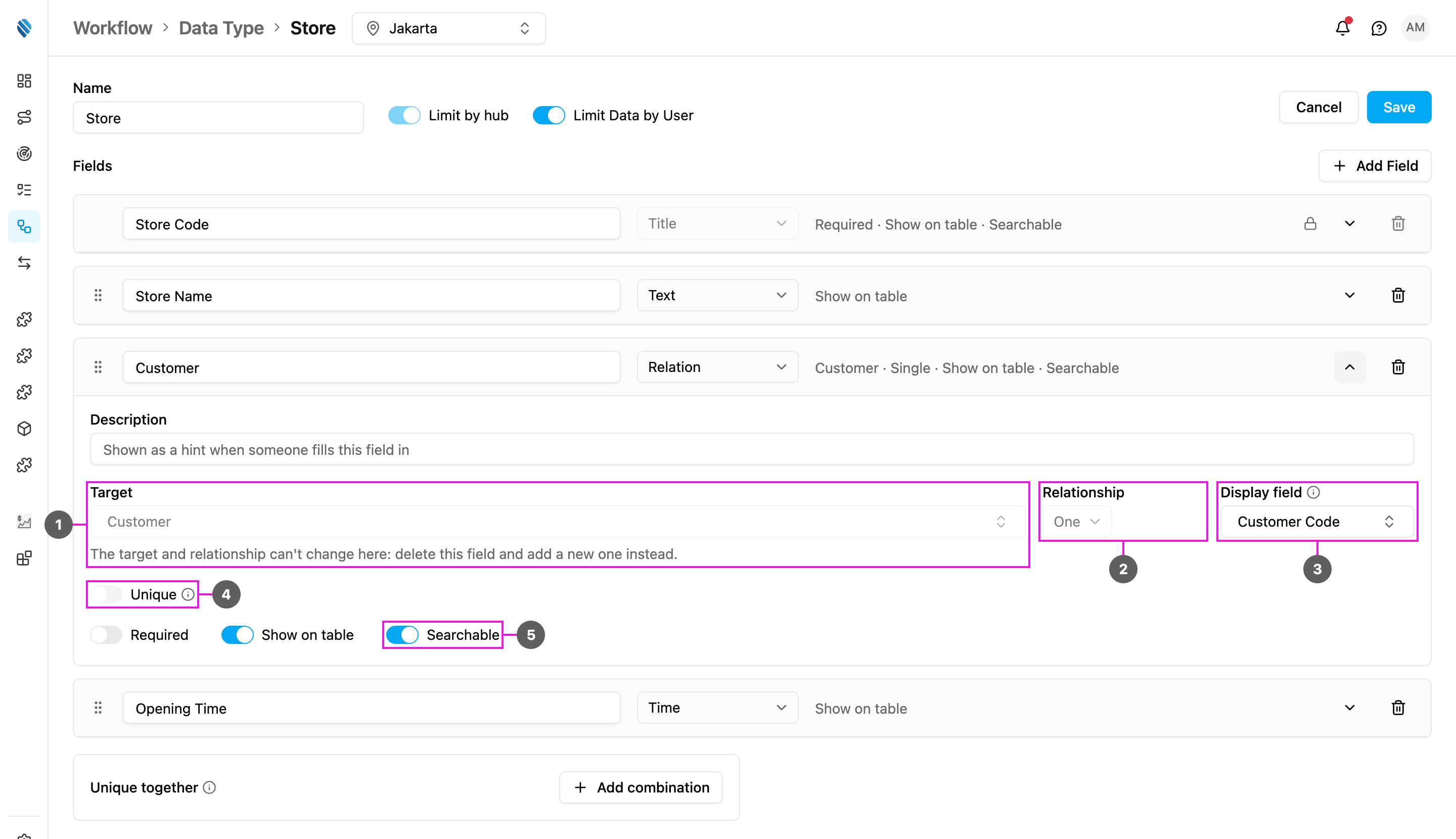
1. **Target**: what the field links to. Choose another of your data types under **Data source**, or a **User**, **Hub**, **Vehicle**, **Role** or **Task Type** under **MileApp data**.
2. **Relationship**: **One** links each record to a single target record; **Many** links it to several. The collapsed row shows this as *Single* or *Multiple*.
3. **Display field**: for a link to another data type, which field of the target to show instead of its Title, for example the customer name instead of the customer code.
4. **Unique**: for a **One** relationship, only one record may point at the same target, which makes the link one-to-one.
5. **Searchable**: the Data Source search also matches the title of the linked record, so searching a customer's name finds every store linked to that customer. Only Relation fields have this setting, and at most 5 per data type; once 5 are on, the switch on the others is greyed out.
For a link to a **Hub**, one more switch appears: **Limit to the user's own hubs**, so people can only pick the hubs they belong to.
Once a relation field is saved, its target and relationship can't be changed. The field then says *The target and relationship can't change here: delete this field and add a new one instead.*
### Related records on the target
When another data type links to this one, a **Related records** box appears on this data type's page, beside **Unique together**. It lists every field that points here, for example *Store*, *via its "Customer" field*. Turn one on to show the linked records on this data type's records too: a customer then shows all of its stores. See [Linked records](/pages/workflow/data-source/linked-records).
Range types from earlier versions, such as a number range or a date range, can't be added to a new field.
This documentation is built and hosted on [Mintlify](https://mintlify.com), a developer documentation platform.