> ## Documentation Index
> Fetch the complete documentation index at: https://docsv4.mile.app/llms.txt
> Use this file to discover all available pages before exploring further.
# Introduction
> What an order type is, how an order moves through its steps, and the Order Types list.
An **order type** describes one kind of order your business takes, such as a pickup-and-delivery job, a return request or an installation. It decides three things:
* **Fields**: the data every order carries, for example customer name, phone number and delivery address.
* **Statuses**: the stages an order can be in, for example *New*, *Picked up*, *Delivered*.
* **Steps**: what happens automatically once an order exists: which tasks are created, who they go to, which path the order takes and when it ends.
Orders themselves are created and followed in **Activities › Order**. Each order is made from one order type.
Order types are part of **Order Management**, which is listed as an add-on in **Settings › Add-ons**. The **Workflow › Order Type** and **Activities › Order** menus are built into the web app: a role needs **View Order Type** to open this page, and the add, edit and delete permissions to change order types.
Open **Workflow › Order Type**.
Required permission:
* View Order Type
* Add Order Type
* Edit Order Type
* Delete Order Type
## How an order moves
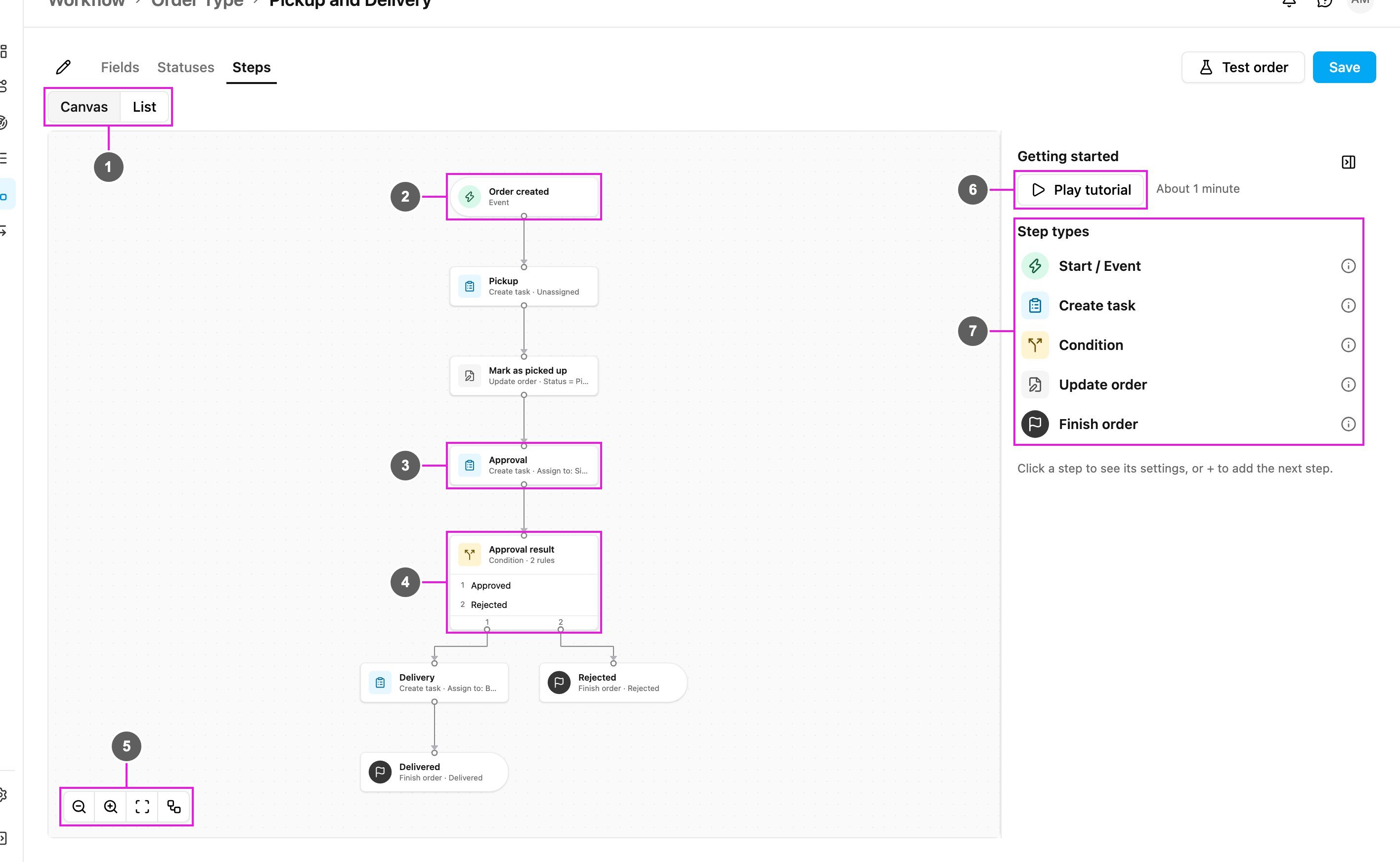
The **Steps** of an order type form a path from top to bottom:
1. A **trigger** starts the order: an order is created, the order reaches a status, or a task of a chosen task type is finished.
2. **Create task** steps create a task for the field team and wait until it is done.
3. **Condition** steps send the order down a different path depending on rules, for example *Approved* or *Rejected*.
4. **Update order** steps change order fields or the status along the way.
5. A **Finish order** step sets the final status and ends the order. Every path must end at one.
In the example above, a new order creates a **Pickup** task. When the pickup is done the order is marked *Picked up* and an **Approval** task goes to a supervisor. If the approval result is *Approved* a **Delivery** task is created and the order finishes as *Delivered*; if it is *Rejected* the order finishes as *Rejected*.
An order keeps following the version of the order type it started with. Changes you save later apply to new orders.
See [Building an Order Type](/pages/workflow/order-type/building-an-order-type) for every step type and setting.
## The Order Types list
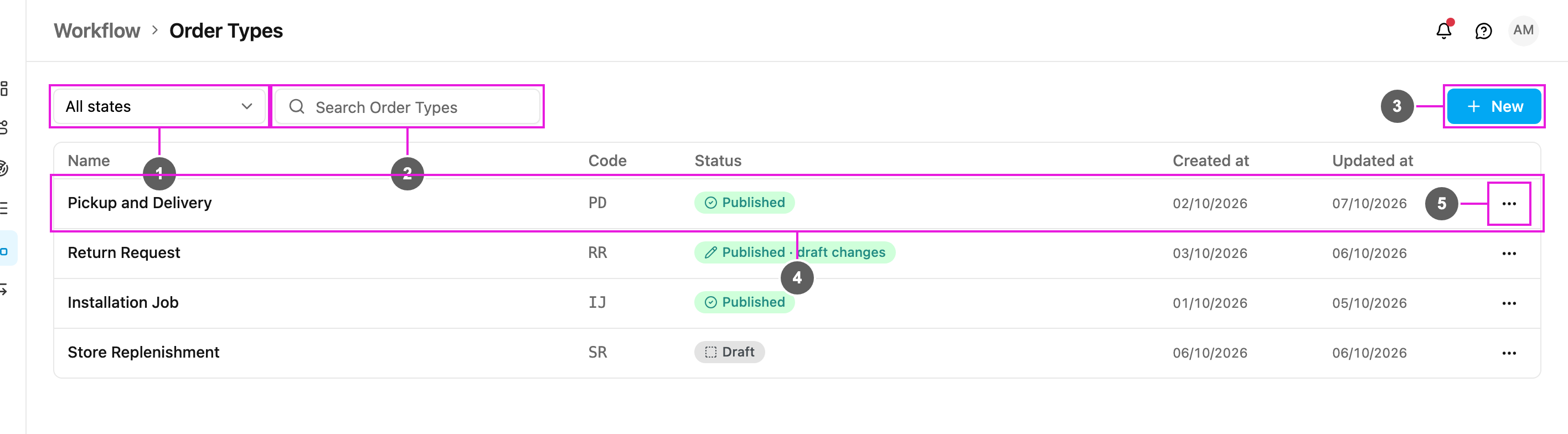
1. **State filter**
Shows **All states**, only **Draft** order types or only **Published** ones.
2. **Search Order Types**
Finds order types by name.
3. **New**
Creates an order type. See [Managing Order Types](/pages/workflow/order-type/managing-order-types#create-an-order-type).
4. **Order type row**
Click a row to open the order type in the editor. An order type that already has steps opens on the **Steps** tab, otherwise on **Fields**.
5. **Row menu (⋯)**
**Duplicate** or **Delete** the order type.
### Columns
| Column | What it shows |
| - | - |
| **Name** | The order type's name, for example *Pickup and Delivery*. |
| **Code** | A short code used in order numbers, for example *PD* gives order numbers such as *PD/2026/10/0001*. |
| **Status** | **Draft**: saved but never live, so no orders can use it yet. **Published**: live, new orders use it. **Published · draft changes**: live, with saved changes that are not live yet because they still have problems to fix. |
| **Created at** | The date the order type was created. |
| **Updated at** | The date of the last saved change. |
The list shows 20 order types per page. When there are none yet, the page shows **No Order Types yet**.
Order types are shared by the whole organization, so the hub picker in the header does not filter this page.
## Next steps
* [Building an Order Type](/pages/workflow/order-type/building-an-order-type): fields, statuses, steps and saving.
* [Getting Started Tutorial](/pages/workflow/order-type/getting-started-tutorial): watch a Pickup → Approval → Delivery example being built.
* [Managing Order Types](/pages/workflow/order-type/managing-order-types): create, rename, duplicate, test and delete.
This documentation is built and hosted on [Mintlify](https://mintlify.com), a developer documentation platform.