> ## Documentation Index
> Fetch the complete documentation index at: https://docsv4.mile.app/llms.txt
> Use this file to discover all available pages before exploring further.
# Voice
> Record an audio note on the field app.
**Voice** records audio from the phone's microphone and attaches it to the task, when speaking is faster or clearer than typing.
In the previous version this component was called **Voice Note**. It can only go on field app pages, not on the Initial page.
**Use cases**
* **Explaining an issue** out loud instead of typing it.
* **Customer feedback** in the customer's own words.
* **Context** that photos and text cannot capture.
* **Other languages**: record in the customer's language.
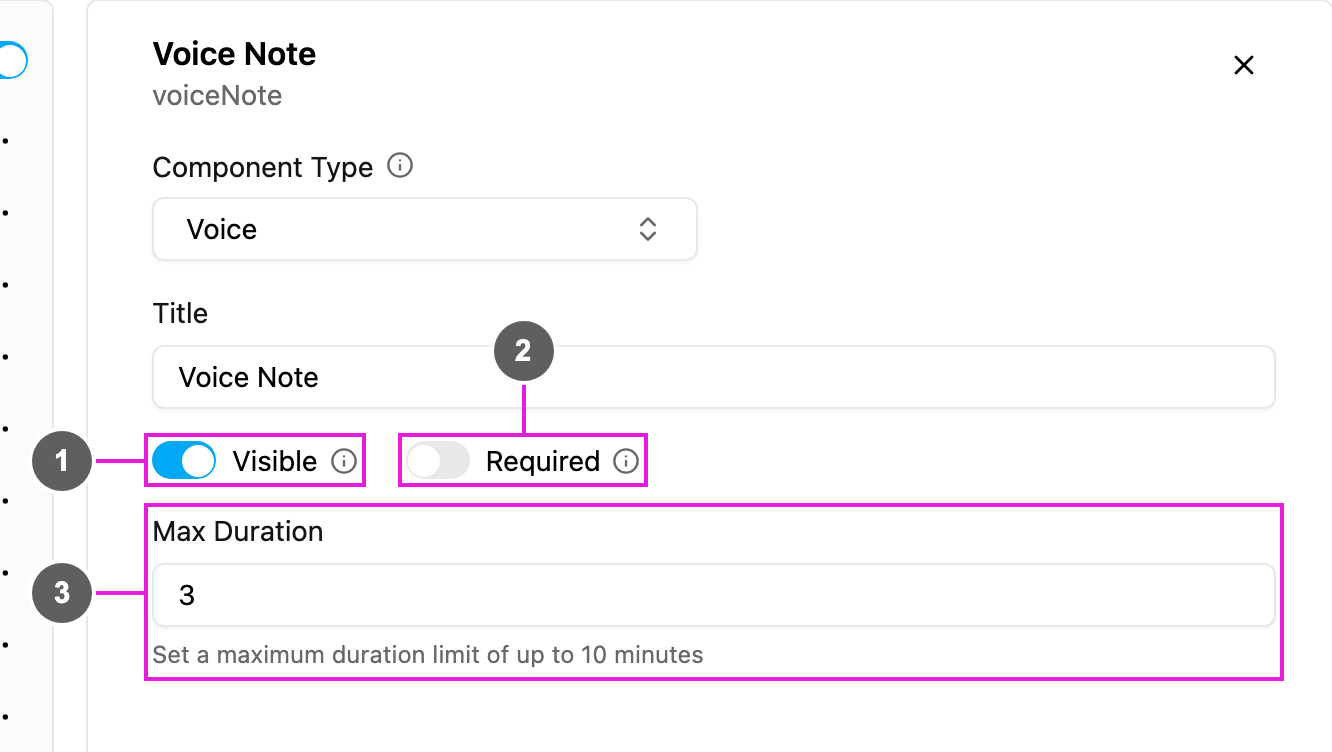
## Properties
1. **Visible**: when off, the component is hidden on the field app; the recording is still kept and exported.
2. **Required**: the task cannot be finished until something is recorded.
3. **Max Duration**: the longest recording, in **minutes**, up to 10. Recording stops by itself at this limit.
## On the field app
The block shows the title and **Record a voice note**. The worker taps to start, sees the time counting, and taps again to stop. The recording is attached to the task. See the preview on the [Photo](/pages/workflow/task-type/components/photo) page.
This documentation is built and hosted on [Mintlify](https://mintlify.com), a developer documentation platform.