

Required permission:
- View Data Export
- Export task, to export tasks
- Export Data Source, to export data source records
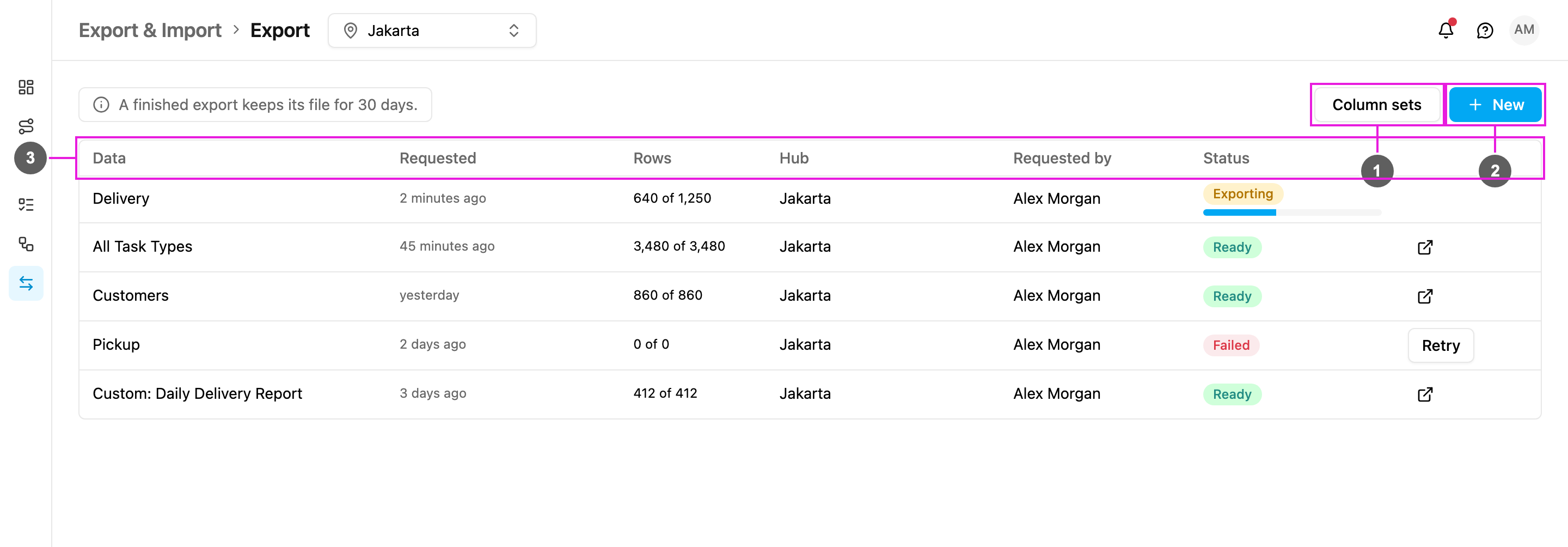
- Column sets: saved lists of columns to export, in a fixed order. See Column sets.
- New: start an export. See Filters and columns.
- The export list: one row per export, newest first.
The export list
- Download: click the link icon on a Ready row to open the file. You can only download an export when its status is Ready.
- No rows to download shows instead of the link when the export found nothing to write.
- Another hub shows instead of the link when the export covers a hub you do not have access to.
- Retry: a failed export keeps the request that produced it. Click Retry to run the same export again without filling in the dialog.