

Your data does not change. Task types, tasks, data sources, automations, routes and users all carry over, and the field app works the same way.
The new menu at a glance
The left menu now has six entries, and Settings opens its own menu.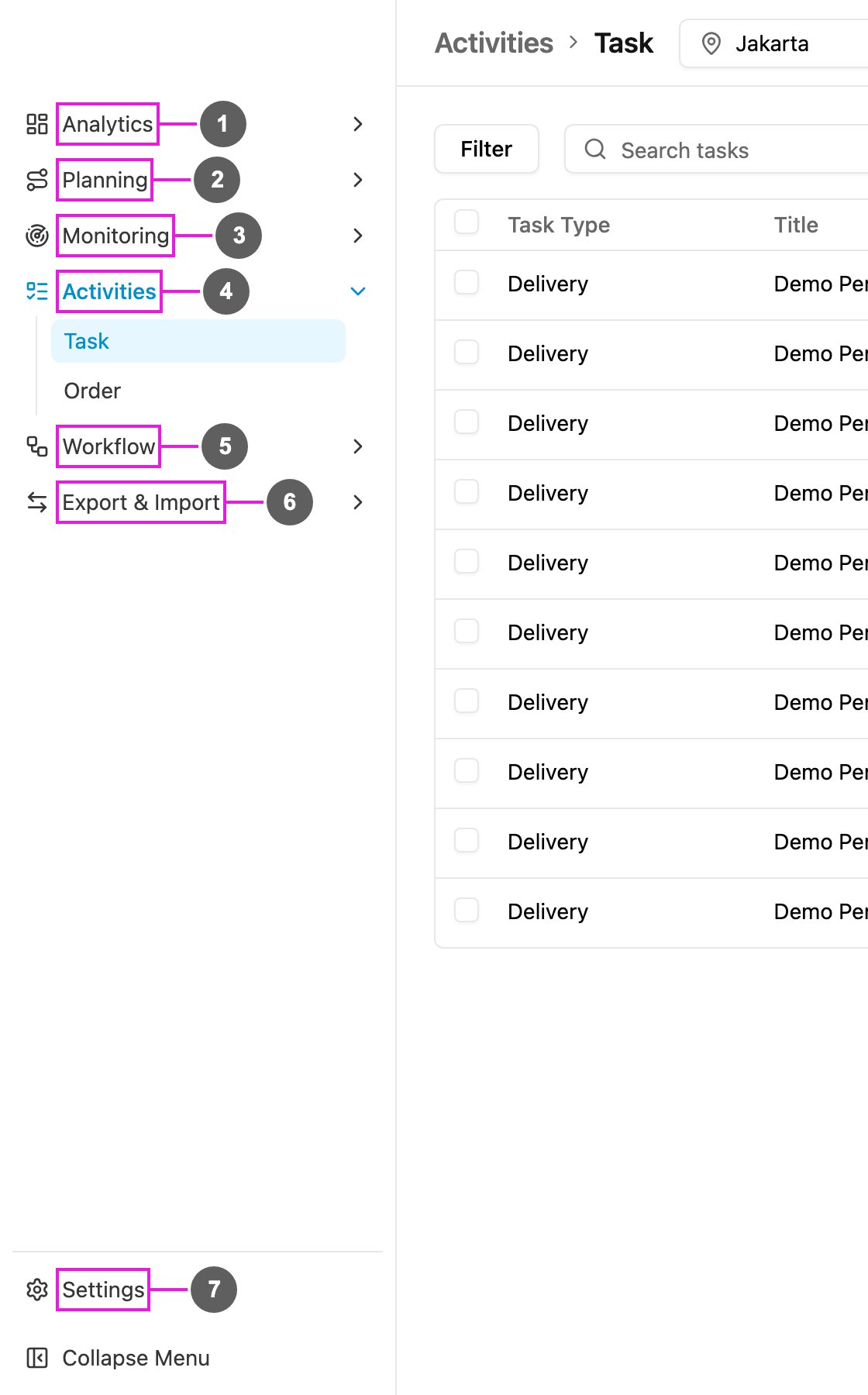
- Analytics: dashboards and Insight.
- Planning: Routing (Visit, Configuration, Result) and Schedule (Task, Routing).
- Monitoring: Tracking, Alert and Chat.
- Activities: Task (with Gallery) and Order.
- Workflow: Data Type, Data Source, Task Type, Order Type and Automation.
- Export & Import: Export and Import.
- Settings: users, roles, hubs, monitoring settings and extensions.
Where did my page go?
Old links and bookmarks still work: they open the page in its new place.New in this version
Analytics
Analytics
- Build your own dashboards from widgets: numbers, line, bar and donut charts, tables, text, banners and a heat map.
- Start from a template or a blank page, rearrange and resize widgets, and undo or redo changes.
- Filter a dashboard by time range, several hubs at once, task type and user.
- Share a dashboard with chosen roles.
- Insight: ask about your operations in plain language, keep a history of your conversations and rate each answer.
- Report: save a report on tasks or data source records with the columns you choose, run it for a date range, and export it. See Report.
Planning
Planning
- The Visit map shows your geotag areas with how many visits fall in each.
- Vehicles are added, edited and removed in Configuration, together with the rest of the routing settings.
- Result has a new Summary tab and stays fast with very large fleets.
- Task schedules show a preview of when the next tasks will be created.
- Routing Schedule: run route optimization automatically on a repeating schedule. See Routing Schedule.
- Visit is redesigned: a full-width table with a filter-first toolbar, the map in its own window, and an edit dialog with an explicit Save.
- Configuration saves each change as you make it, each section explains itself, and vehicles can be imported from a spreadsheet.
- Result shows hub names and addresses on the start and return stops, with separate ETA and ETD.
Monitoring
Monitoring
- Tracking updates live instead of every few minutes.
- Chat with a driver and broadcast a message to many drivers straight from Tracking.
- The location source filter has an All option.
- Alert keeps a history of geofence, idle, lateness and route deviation alerts, with a detail view for each one.
- Emergency (panic) alerts appear on screen wherever you are, in the notifications bell and as a pin on the Tracking map.
Activities
Activities
- Task filters are kept in the page address, so a filtered list can be bookmarked or shared.
- Columns can be resized as well as shown, hidden and reordered.
- Share to vendor: share one or many tasks with a vendor and revoke access later.
- Do Task on the web uses a built-in form instead of an embedded copy of the field app.
- Order: create, import and follow orders step by step. See Order.
Workflow
Workflow
- Data types can link to each other, so a record can point to records of another type.
- Task type version history lists what changed between versions: fields added, edited, removed or moved.
- The task type builder warns you before you leave with unsaved changes.
- Build with AI retries automatically when the first draft has errors.
- Order Type: design how orders move from step to step, with a guided tutorial. See Order Type.
- Import from V3: move or copy a data type from the previous version, with or without its records. See Import from V3.
- Data source search matches every field of a record.
Export & Import
Export & Import
- Import handles tasks as well as data source records.
- Imports have a column mapping step, saved mapping presets, a preview and a list of required fields.
Settings
Settings
- A separate Settings menu, grouped by purpose.
- Alert Setting: turn each alert type and its notification on or off.
- Geofence: search for an address and draw your own polygon.
- SMS gateway: send a test message before you save.
- Custom Module: add pages built for you inside the app, placed as a menu or a submenu.
- Add-ons has its own menu entry.
- Users and hubs can carry extra fields you define.
Account
Account
- The getting-started tutorial opens as a dialog.
- Change Password shows how strong the new password is.