

In the add-on catalogue this add-on is listed as PDF Generator V4. It replaces the PDF Generator of the previous version, with the same two pages under the same addresses.
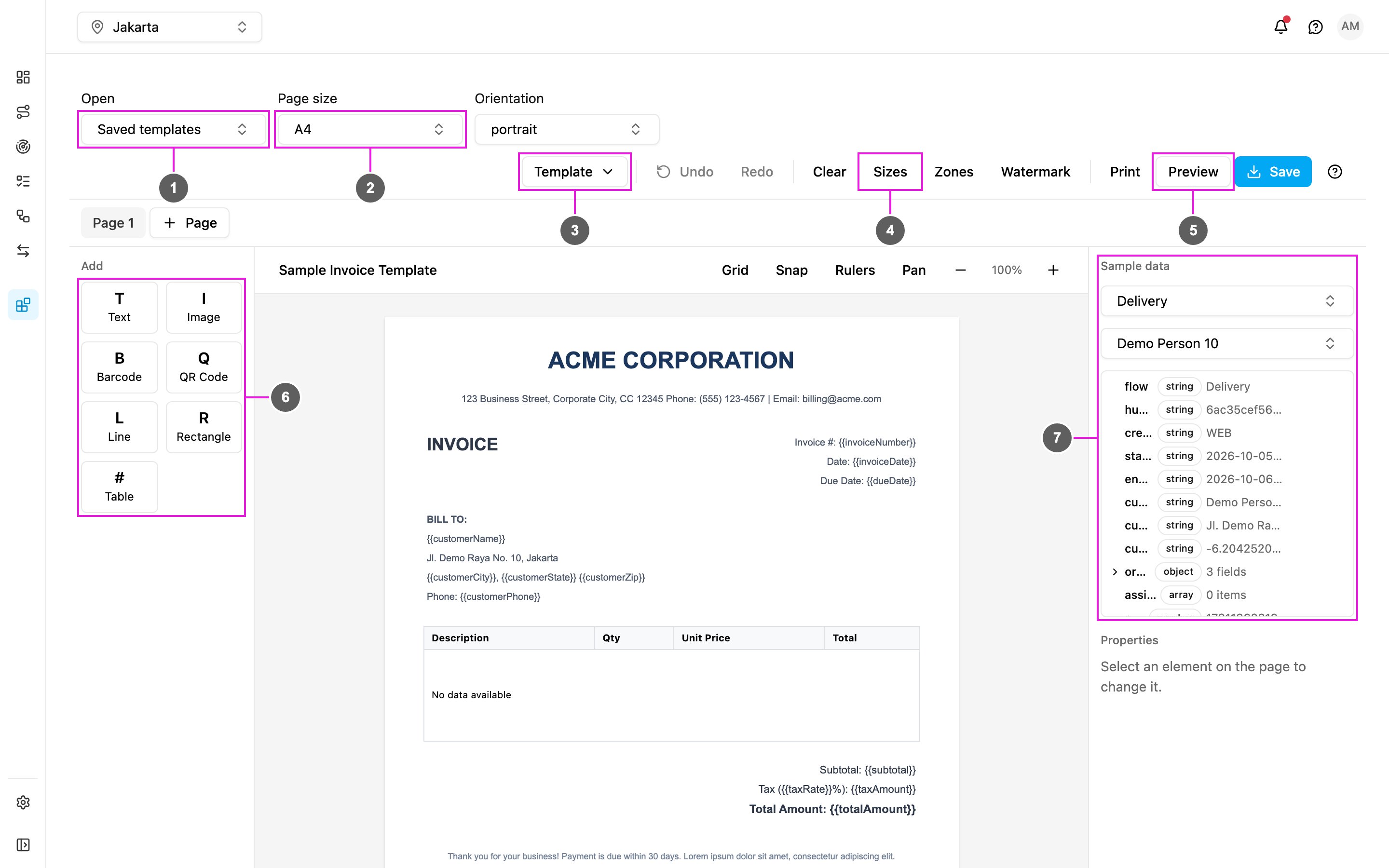
- Open: load one of your saved templates.
- Page size: the paper size of the template, with Orientation beside it.
- Template: Library, Save as new, Export, Import and Reset add-on.
- Sizes: your custom page sizes. Beside it are Zones (header and footer bands) and Watermark.
- Preview: the template filled with the sample task, beside Print and Save.
- Add: the seven element types to place on the page.
- Sample data: a flow and a task whose values fill the bound elements, with the task’s fields to browse.
Key concepts
Pages
The add-on has two pages, both under its entry in the left menu:Who uses it
- Administrators add the add-on, run the one-time setup and give roles access to its pages.
- Managers design templates for delivery receipts, inspection reports and other documents.
- Operations teams use the Task List to filter tasks and print or export documents, one at a time or many at once.
Getting started
- Add the add-on in Settings › Add-ons.
- Set it up.
- Design a template.
- Print and export from the Task List.