

Required permission:
- View integration
- Create integration (to connect)
- Edit integration (to change the gateway)
- Delete integration (to disconnect)
The SMS gateway card is offered to selected accounts only. If you don’t see it, contact support.
Connect a gateway
Open Settings › Integration and click Connect on the SMS gateway card.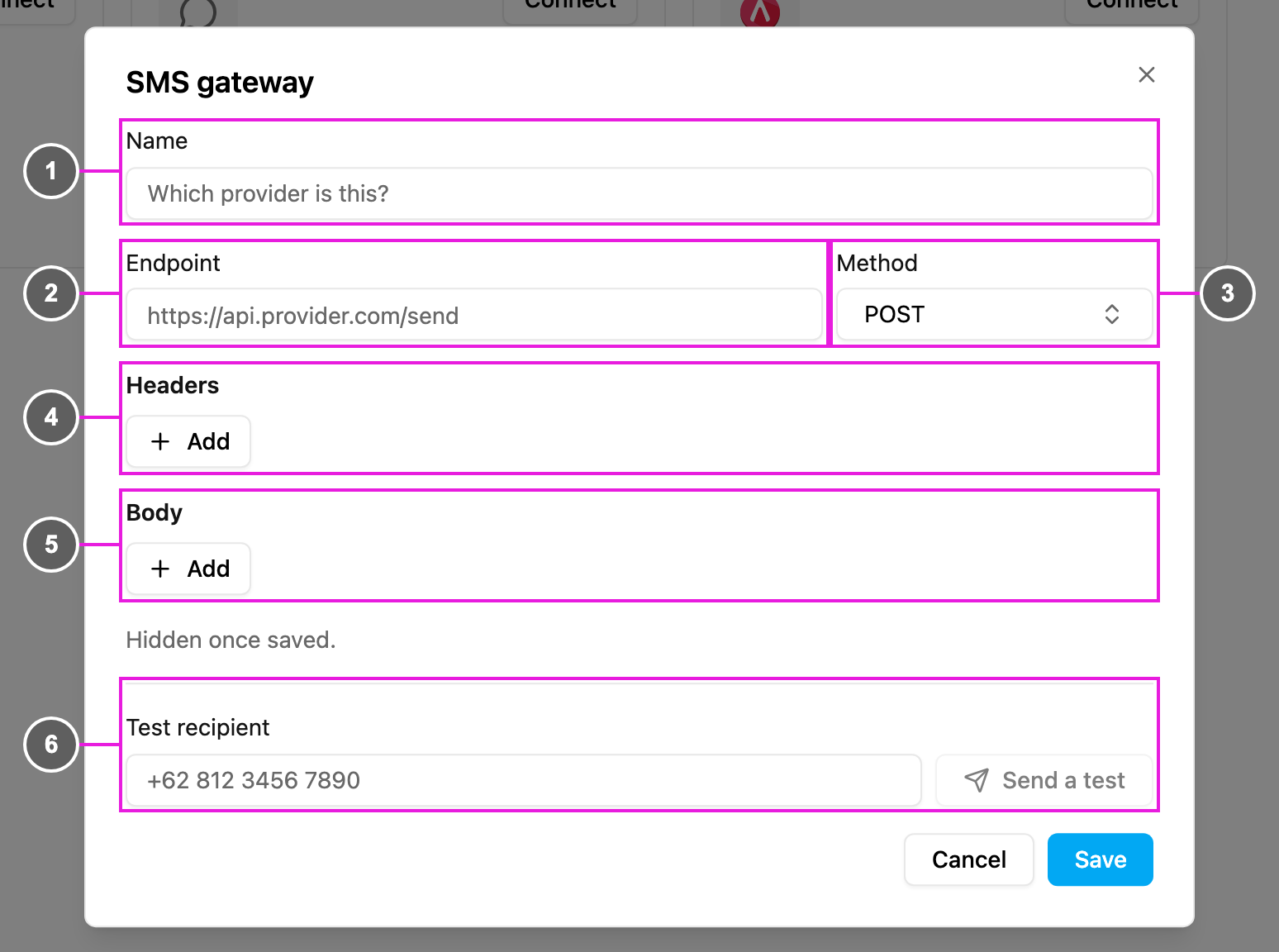
- Name: which provider this is, for example the provider’s name. Required.
- Endpoint: the full
http://orhttps://address the app sends each SMS to, as given in your provider’s API documentation. - Method: POST (the default), GET or PUT. With GET, the body fields are sent as query parameters on the endpoint.
- Headers: click Add for each header your provider needs, such as an API key or
Content-Type. Each row has a Name and a Value. - Body: click Add for each field the request carries, such as the recipient, the message and a sender ID.
- Test recipient: a phone number to receive a test message, then Send a test.
Fill in the recipient and the message
In any header or body Value, write these placeholders where your provider expects the details of each message. They’re replaced every time an SMS is sent:
For example, a provider that expects
to, text and from fields gets three body rows:
The body is sent as JSON. If your provider expects a form instead, add a header Name
Content-Type with Value application/x-www-form-urlencoded.
Keep keys hidden
Each header and body row has a Secret checkbox. Tick it for API keys, passwords and tokens: the value is masked while you type and is hidden once saved, so nobody can read it back from the dialog later. To change a secret, type the new value. Use Remove to delete a row.Send a test
Before you rely on the gateway, check that your provider accepts the request:- Type a phone number in Test recipient, for example
+62 812 3456 7890. - Click Send a test. The button works once Endpoint is a full
http://orhttps://address.
Change or disconnect the gateway
- Click Edit on the card to change any field, then Save. The toast SMS gateway updated confirms it.
- Click Disconnect and confirm to remove the gateway. SMS goes back through the built-in provider and uses Credits again. Automations don’t need to change.