

Required permission:
- View automation
- Create automation
Set it up
Choose Automation Type › Notification. WhatsApp is the default channel.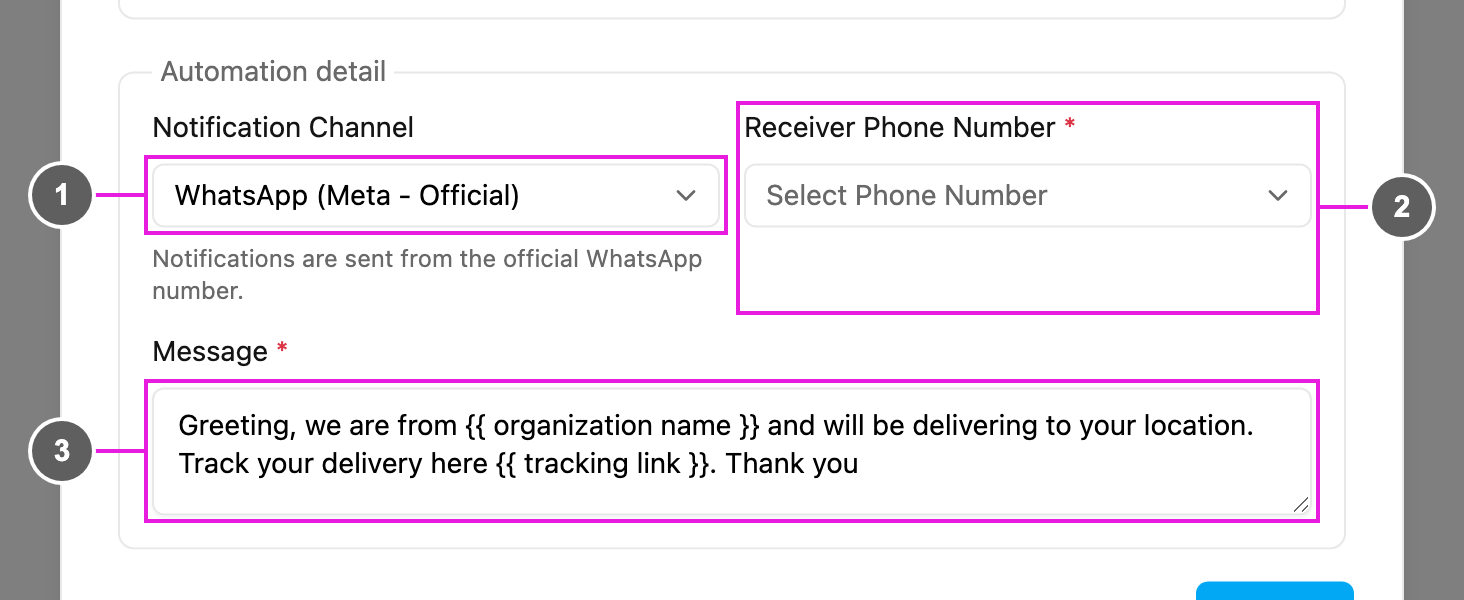
- Notification Channel: WhatsApp (Meta - Official). The note under it says messages are sent from the official WhatsApp number. Accounts without the official sender see WhatsApp (Fonnte) instead; see Fonnte.
- Receiver Phone Number: required. The field of the task type that holds the recipient’s phone number, for example the customer’s phone. The task’s value for that field is where the message goes.
- Message: required. The text to send, prefilled with the default message. Use
{{ organization name }}and{{ tracking link }}to insert your organization’s name and the task’s tracking link.
WhatsApp (Fonnte)
Accounts without the official WhatsApp sender send through Fonnte, a third-party WhatsApp service. With WhatsApp (Fonnte) selected, an extra required field appears:- API Key: your Fonnte API key. Connect your WhatsApp number to Fonnte first; Fonnte then gives you the key. Fonnte is a paid service, so you need an active Fonnte subscription.