

hh:mm format.
Use cases
- Opening and closing hours of a store, for route planning.
- Preferred delivery time.
Properties
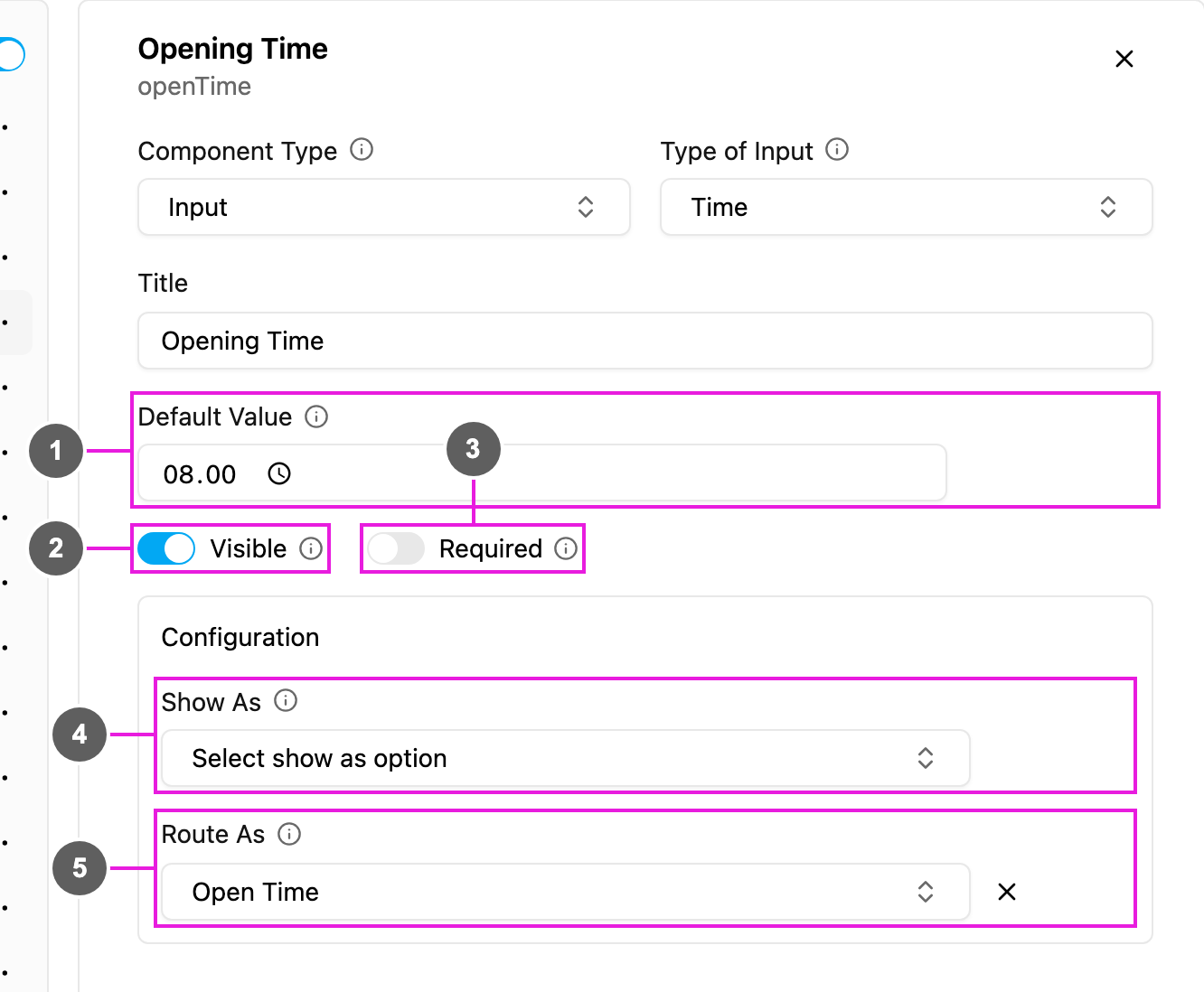
- Default Value: a time filled in for every new task, in
hh:mm. - Visible: when off, the field is hidden on the web and the field app; its value is still kept and exported.
- Required: the task cannot be saved or finished until a time is picked.
- Show As: show the time in the task list as the task’s Title, Content or Label.
- Route As (Initial page only): pass the time to route planning as the visit’s Open Time or Close Time, so the visit is planned inside its opening hours.
The previous version listed Open Time 1, Open Time 2, Close Time 1 and Close Time 2. The task type now maps Open Time and Close Time; more opening periods are set on the task type’s Route configuration with Add Open Time.
How to set it up
Click Add component, choose Input, set Type of Input to Time, write the Title, and set Required, Visible and the Default Value. On the Initial page, pick Route As if the time is an opening or closing hour.On the field app
The field opens a time picker inhh:mm. It can already be filled from task creation or from the Default Value, and the worker can change it before finishing the page.